FindGovData.org Technical Overview

This is a deep-dive into the technology powering findgovdata.org, a website that allows you to search 540K+ publicly available U.S. government datasets using modern hybrid search. To learn more about findgovdata.org visit our intro post.
Introduction
catalog.data.gov comes with its own search (source code). They offer full-text search of the datasets via OpenSearch implementation. It works. But we found the search experience is a bit underwhelming. Some queries return no results, you have to know the exact terminology used in the dataset description or tweak the query with ANDs and ORs. There is no semantic (related concepts) search.
We know that a good relevant search is hard. We know that the government developers and contractors operate under a complex set of budgetary, organizational, technical, and legal constraints. We know that OpenSearch is fully capable of doing vector semantic similarity search. Yet for whatever reasons, the search is implemented the way it is. We wondered if offering an improved version of the search can benefit the public AND showcase Amgix capabilities at the same time.
Requirements
Setup a system using Amgix that provides a hybrid search of public data.gov datasets. Specifically:
- Better search relevance: combine keyword and semantic search signals
- Fast search results: typeahead performance, if possible
- Helpful UX: give users some knobs to tailor their search experience to their needs
- Modern UI: clean user-friendly interface that makes it easier to interact with the data
- Budget hardware: no GPU inference; how cheap can this get?
Amgix Terminology
Before we get into the implementation details it may be helpful to define some Amgix specific terminology and concepts:
-
Amgix: modular distributed open-source hybrid search system that can run as a single container or as a distributed cluster.
-
Amgix One: an image packaging all essential Amgix cluster components to run as a single container.
-
Amgix Now: high-performance hybrid search engine (Rust). It implements full (almost) Amgix API and can run in a stand-alone mode or as a part of Amgix cluster. Unlike Amgix One/Cluster, it only supports synchronous ingestion and it only collects and reports metrics in cluster mode.
-
Both Amgix One and Amgix Now ship with everything one needs to run the search system in a single container. But they can also be configured to point to external data storage (Qdrant supported by both; PostgreSQL and MariaDB are also supported by Amgix One) and message broker (RabbitMQ) to form or join a cluster.
-
WMTR: custom Amgix tokenizer that represents text as a sparse vector in multiple views simultaneously: surface level, full text, and character-level views. It's typo-tolerant, captures partial string matches, and works well on both: identifier-heavy data (SKUs, part-numbers, special characters, etc.) and natural language (NL) text. Because it is not a model-based tokenizer, it's not compute heavy and it's very fast. It is the default keyword tokenizer in Amgix (
keywordvector type is just an alias forwmtr).
Implementation
Hardware
We knew coming into this that CPU query embedding (and catalog indexing) will be the slowest part of the system. So we had to find the minimal hardware configuration that doesn't break our budget, which is frankly: $0.
In Google Cloud, at first, we tried multiple instances of the budget E2 lineup of VMs. Unfortunately, it wasn't even the number of available cores, but the per-core performance that turned out to be the bottleneck. Older (probably Broadwell family of CPUs) just didn't deliver the inference speeds that felt acceptable. Single hybrid search queries came back in over 150ms even on 4 vCPU configurations. We aimed lower if we were to deliver on our typeahead performance requirement. Eventually, we settled on t2d-standard-2 instance:
2 vCPUs (AMD), 8GB of RAM.
That's right, the entire system runs on two CPU cores and delivers hybrid search results on 540+K records dataset in 30-40ms for simple queries. 8GB of RAM is bit of an overkill for what we do, but it's nice to have some headroom. We'll share some performance metrics later in this post.
Architecture
On the above VM we run a simple Amgix cluster in 5 Docker containers:
---
config:
    htmlLabels: false
---
flowchart TB

  or[OpenResty] <-->|fast search| an["`**Amgix Now**`"]
  or <-.->|search failover| ao["`**Amgix One**`"]

  an <--> br([RabbitMQ])
  ao <--> br
  an <--> db[(Qdrant)]
  ao <--> db

  ao -->|metrics / dashboard| ob[Observability]@{shape: braces}

  harvest[Nightly Data Sync]@{shape: braces} -.->|async bulk ingestion| ao

  or ~~~ harvest
Operational Note
If you are looking at this architecture and thinking "I don't want to manage five containers just to get hybrid search," you don't have to. For most projects, you can collapse this entire stack into a single container running Amgix One or a standalone Amgix Now. We chose this split-container topology specifically to isolate our background nightly data ingestion pipelines from our hot-path search loops on a zero-dollar hardware budget.
The entire system could have looked like this:
flowchart LR

  or[OpenResty] --> an[Amgix One]
or even like this:
flowchart LR

  or[OpenResty] --> an[Amgix Now]
So why did we choose the more complex setup? Let's break it down by function:
-
OpenResty: Frontend web server/proxy, serving static website, translating search queries, providing caching and rate limiting.
-
Amgix Now: high-performance hybrid search engine
-
Amgix One: Amgix cluster node for cluster coordination, nightly asynchronous data ingestion/embedding, metrics collection and exposure. Also serves as a backup search node if Amgix Now is down for maintenance.
-
RabbitMQ: Cluster communication, asynchronous ingestion and metrics collection support
-
Qdrant: Data storage and vector search backend
The entire stack could have been collapsed into an instance of Amgix One, but given our resource constraints (2 CPU cores) we wanted to make Amgix Now (implemented in Rust) the primary search node to squeeze as much search performance out of the hardware as possible. Amgix Now on its own lacks a couple of functions we wanted: it only collects metrics as a part of the cluster and it doesn't have asynchronous ingestion, which would be very convenient for nightly bulk ingestion of the large dataset. Hence, we added Amgix One into the mix and externalized the deployment of RabbitMQ and Qdrant so that the two instances of Amgix could share them.
What's nice about Amgix is that its modularity allows for many deployment options. You can run on a single container. You can choose between high performance of Amgix Now or convenience of async ingestion and observability of Amgix One. Or you can setup a cluster of individual components and scale them individually based on your needs and utilization patterns.
A note about scaling
As you will see later in our performance section, unless searching government data becomes a popular pastime activity, it's highly unlikely we will ever need to scale this system either vertically or horizontally. But looking at the current architecture, you can see how this could easily be done, if needed. Simply adding more Amgix Now instances to the cluster will scale the search beautifully. Qdrant and even RabbitMQ can also be scaled up into separate clusters both vertically and horizontally.
What is the memory footprint of the stack, you may ask. Not as much as you would imagine:
| Container | Search Memory (MiB) | Indexing Memory (MiB) | Post-Indexing Memory (MiB) |
|---|---|---|---|
| OpenResty | 20 | 20 | 16 |
| Amgix Now | 256 | 264 | 324 |
| Amgix One | 322 | 811 | 675 |
| RabbitMQ | 133 | 190 | 181 |
| Qdrant | 455 | 2264 | 853 |
| Total | 1186 | 3549 | 2049 |
Search Memorycolumn represents the memory after containers were started and a few searches were executed.Indexing Memoryis sampled at a point in the middle of the re-indexing of the dataset.Post-Indexing Memoryis sampled at some time after the re-indexing of the dataset is done.
Obviously, memory use fluctuates, but even when the system is busy indexing/embedding dataset we are still under 4GB. The VM has 8GB, so we have a lot of headroom.
Data and Collection Configuration
The catalog of datasets is downloaded using publicly available endpoint on catalog.data.gov and updated periodically at night. The dataset is rather large (3.5GB of jsonl, uncompressed) and the data is somewhat messy. We use a simple python script to download and cleanup the data before bulk-upserting it into Amgix.
Amgix collection is defined as follows:
{
    "store_content": false,
    "metadata_indexes": [
        {"key": "organization_name", "type": "string"},
        {"key": "organization_type", "type": "string"},
        {"key": "publisher", "type": "string"},
        {"key": "year_updated", "type": "integer"},
        {"key": "imported", "type": "datetime"}
    ],
    "vectors": [
        {"name": "wmtr", "type": "wmtr", "index_fields": ["name"]},
        {"name": "wmtr_content", "type": "wmtr", "top_k": 512, "index_fields": ["content"]},
        {
            "name": "dense",
            "type": "dense_model",
            "model": "BAAI/bge-small-en-v1.5",
            "index_fields": ["content"]
        },
    ]
}
A few things to note here:
- Filterable metadata fields are indexed (Amgix only allows filtering on indexed meta)
-
Three (3) vectors are used to index the data:
- WMTR (keyword search) on name/title field
- WMTR (keyword search) on content (the content of the document is stored as a flat representation of the title, description, list of keywords, list of distribution title, etc.); Because the content field can get rather large, the top_k for this vector is increased from the default of 128 to 512 tokens.
- Dense vector using small
BAAI/bge-small-en-v1.5model.
-
store_contentis set tofalsewhich tells Amgix to store only vectorized representation of thecontentfield to save storage space.
Initial indexing/embedding of the data takes a bit of time, especially on limited CPU cores. Because we use Amgix One as an asynchronous write node, the actual downloading, processing and bulk-upserting of the records (540+K documents) takes only a few minutes. But the real work of embedding the entire dataset may take a couple of hours.
Nightly updates are faster. Thanks to Amgix built-in timestamp deduplication, only changed records need to be embedded, the rest get safely discarded by the engine. The exact time depends on a lot of variables, but mostly on the number of records that changed since the last update.
Website
UI
The website is a custom static Single Page Application (SPA) developed with Vite with code written in TypeScript. No frameworks, no heavy components. Material styles with a custom color theme.
UX
A few things to note:
-
To maximize space and improve user experience all the elements that are not essential to searching and interacting with results are minimized and moved out of the way as soon as the user starts typing
-
About panel explaining the purpose of the website and Advanced Options panel are collapsed by default and displayed only on user's click
-
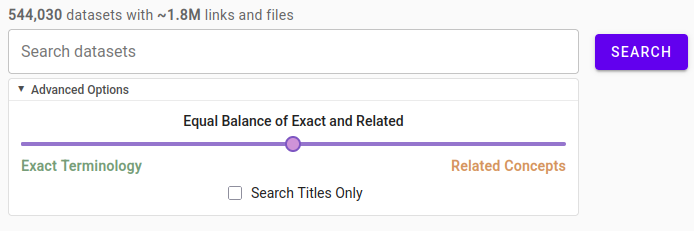
Advanced Options panel exposes just a couple of knobs for users to tweak the hybrid search tuning or search by titles only
-
Curiously, finding the language to describe to a non-technical user what the hybrid balance slide does was the most difficult part of this. We are still not sure if we've got this right.

- Some filtering options are embedded in search results panels for quick access
Typeahead Performance
For the typeahead experience (displaying results on every keystroke) we had to get a little creative. This can generate a lot of queries and given our limited server resources, doing model embeddings at this rate can slow things down a bit. In order to avoid the overhead, as user types we search only with two lightweight non-model based WMTR vectors (or one if the user searches for titles only). These queries find results in 10-15ms, then when user stops typing we execute the full-hybrid query (if needed). The whole process is fast and WMTR relevance is good enough that the transition is seamless.
Observability
For observability and monitoring we have the following:
-
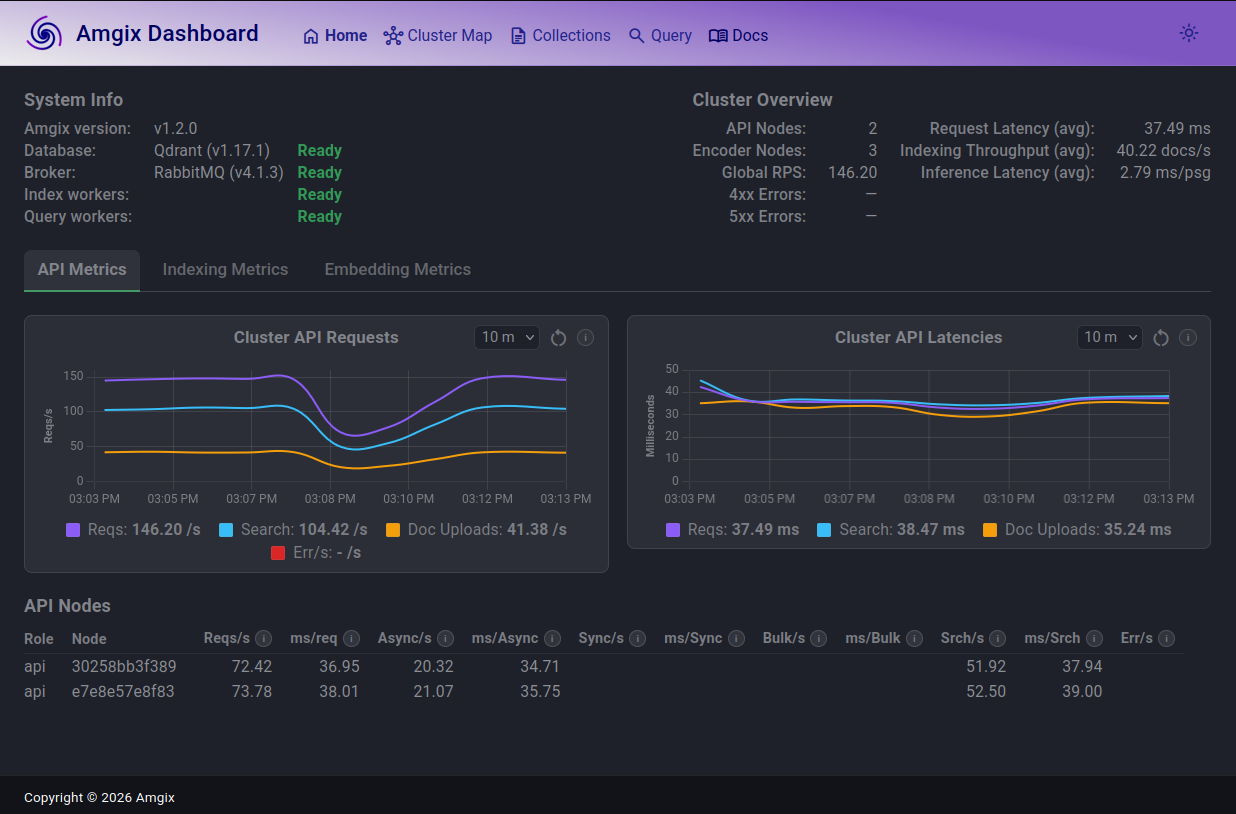
First of all, we can use Amgix One built-in dashboard to monitor cluster's live metrics and historical trends for up to 7 days.
-
Amgix One also exposes current metrics via
/v1/metrics/prometheusendpoint. We scrape those metrics using Google Cloud Ops Agent installed on the VM and ship them to Google Cloud Monitoring -
We also use Ops Agent to ship container logs to Google Cloud Logging
-
Between the Prometheus metrics from Amgix One and the log-based metrics from OpenResty container we are able to create nice Dashboards and setup the alerts to monitor the system in Google Cloud Monitoring
Performance
We ran some load testing on the site using Locust test harness and a mix of 80% keyword searches and 20% full hybrid searches to see how much searching this 2 vCPU core machine can handle. Virtual/Locust users fired short random (no caching can kick in) search queries with 0.1-0.5 seconds delays.
While reading the numbers below, it is also important to keep in mind that even for keyword-only searches, Amgix performs search on 2 WMTR vectors (one for the title and one for the content field).
The results below are the breakdown of latency numbers by two dimensions:
- How long it took Amgix to find the results (
Server) vs total request time including the internet/network time (Total) - Keyword-only searches (
KW) vs Hybrid searches (H)
| Virtual Users | Total RPS | Amgix KW (p50 ms) | Amgix KW (p95 ms) | Amgix H (p50 ms) | Amgix H (p95 ms) | Total KW (p50 ms) | Total KW (p95 ms) | Total H (p50 ms) | Total H (p95 ms) |
|---|---|---|---|---|---|---|---|---|---|
| 1 | 2.8 | 10 | 14 | 38 | 45 | 46 | 51 | 74 | 81 |
| 5 | 14.1 | 10 | 17 | 38 | 58 | 47 | 56 | 76 | 95 |
| 10 | 27.4 | 11 | 23 | 42 | 69 | 49 | 140 | 80 | 180 |
| 25 | 64.5 | 19 | 60 | 63 | 130 | 58 | 200 | 100 | 210 |
| 30 | 76.5 | 27 | 84 | 82 | 160 | 65 | 190 | 120 | 240 |
| 40 | 93.3 | 51 | 170 | 130 | 270 | 94 | 250 | 170 | 340 |
| 50 | 99.8 | 87 | 350 | 190 | 480 | 140 | 400 | 240 | 520 |
| 75 | 109.25 | 240 | 810 | 350 | 950 | 290 | 860 | 400 | 1000 |
- Total request times include real-world network conditions on our end (residential WiFi, shared with other traffic), so treat the Total columns as illustrative rather than a clean network benchmark. Server time is the number that reflects Amgix's actual processing time.
Let's plot Server p50 as a function of RPS:
At low loads keyword p50 is 10-11ms and hybrid at 38-42ms. Below about 80 RPS the system is pretty stable, delivering search results in under 30ms for keyword searches and under 100ms for hybrid. Then CPU cores begin to saturate, latencies rise and by about 100 RPS the system throughput plateaus and additional load just results in slower response times. Importantly, the system doesn't fall over - it just slows down under heavy load.
Feedback is Welcome
If you have any feedback or questions about Amgix or findgovdata.org feel free to reach us by using the feedback button on findgovdata.org or our Contact page.